
The terminal AI agents can drive.
Run Claude Code, Codex and Gemini side by side. Unterm shows what each one is doing, puts the one waiting on you first, and lets agents drive the terminal themselves.
1.3k downloads· Free and open source (MIT) ·Other platforms
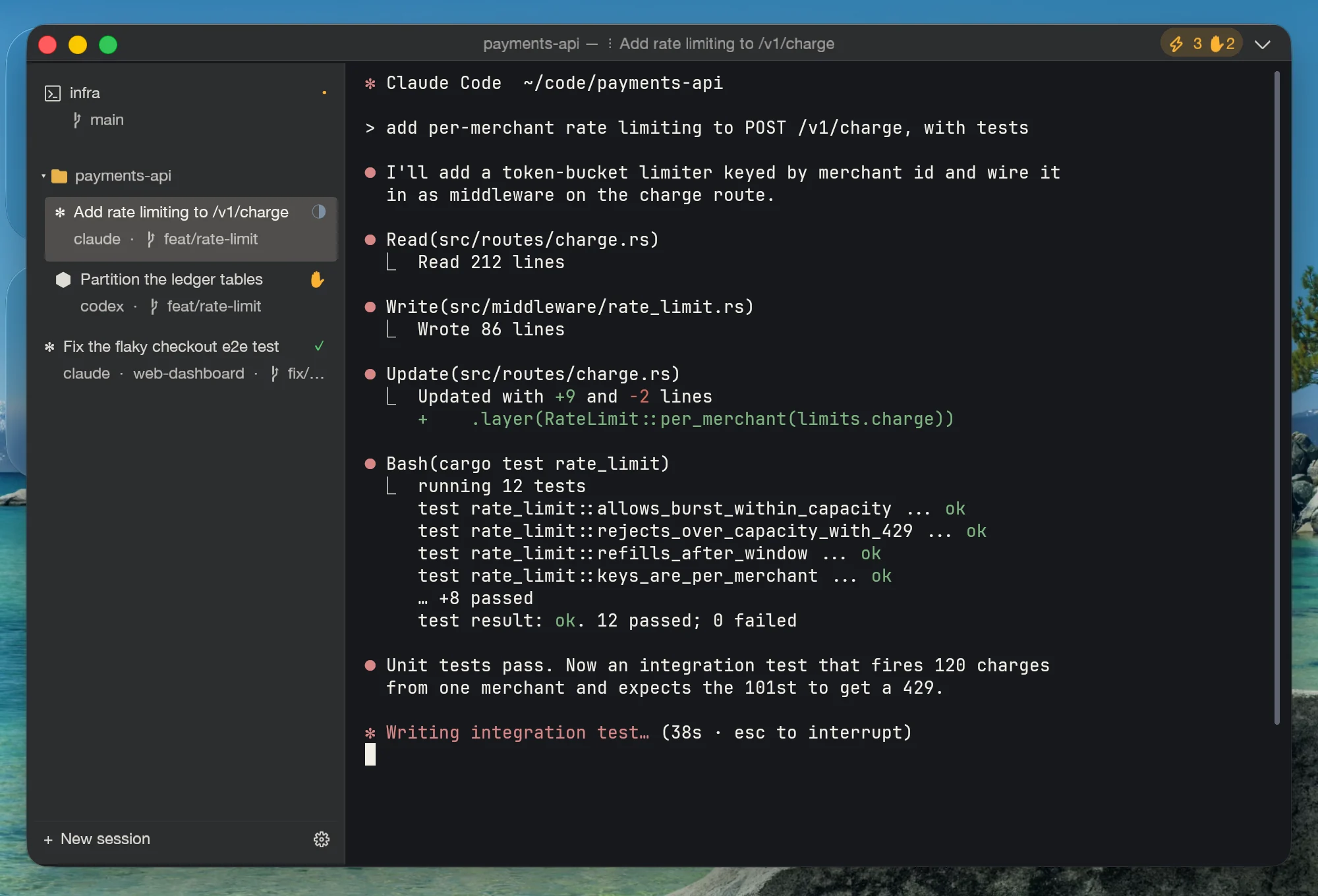
Three agents, one glance
Stop cycling through tabs to find out who is done. Every row says what its agent is working on, and the one that needs you is marked.
Rows read “Add rate limiting to /v1/charge”, not “zsh”. Underneath: which agent, and which branch it is on.
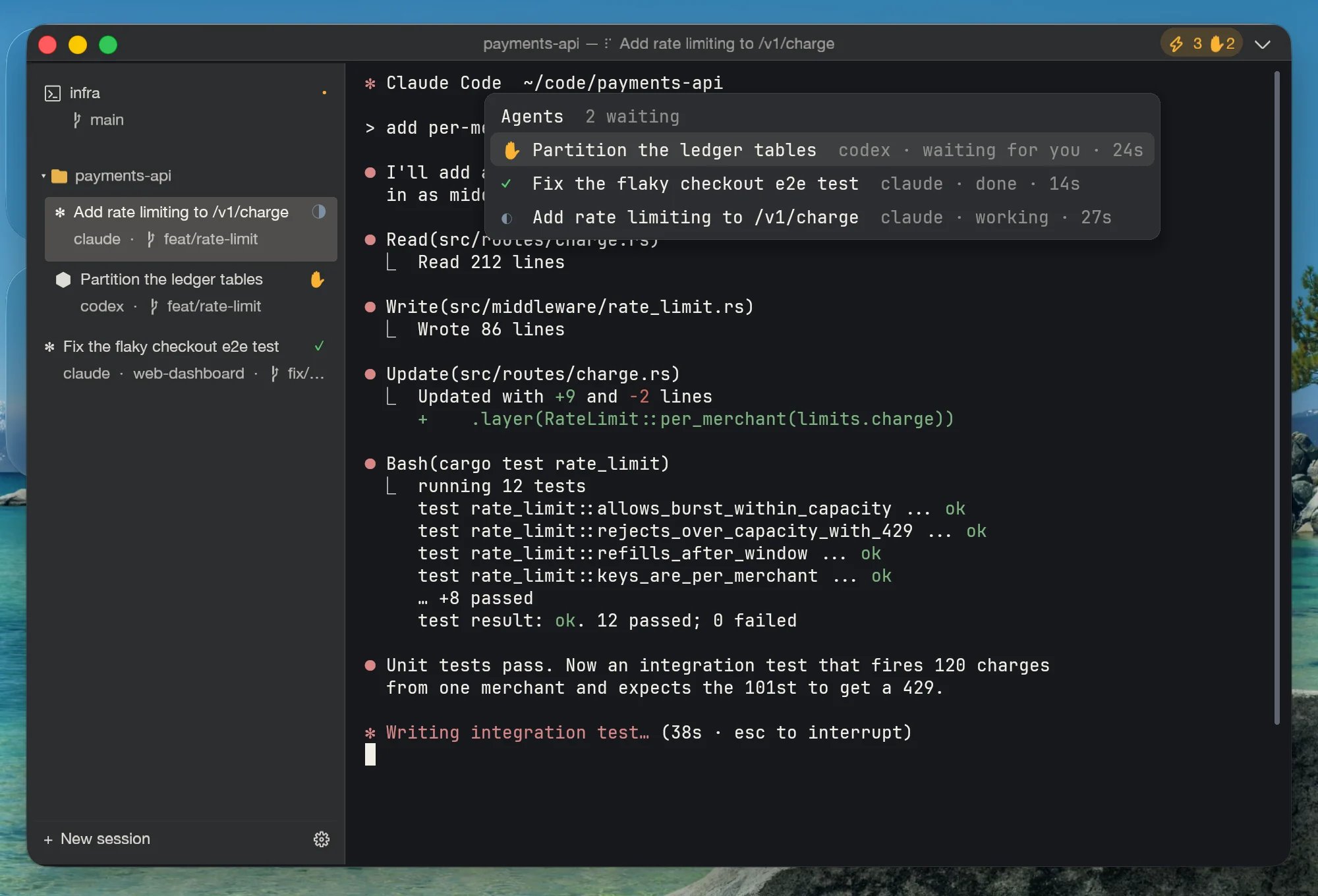
Ctrl Shift A opens the inbox: whoever needs an answer is on top, then what has finished, then what is still running.
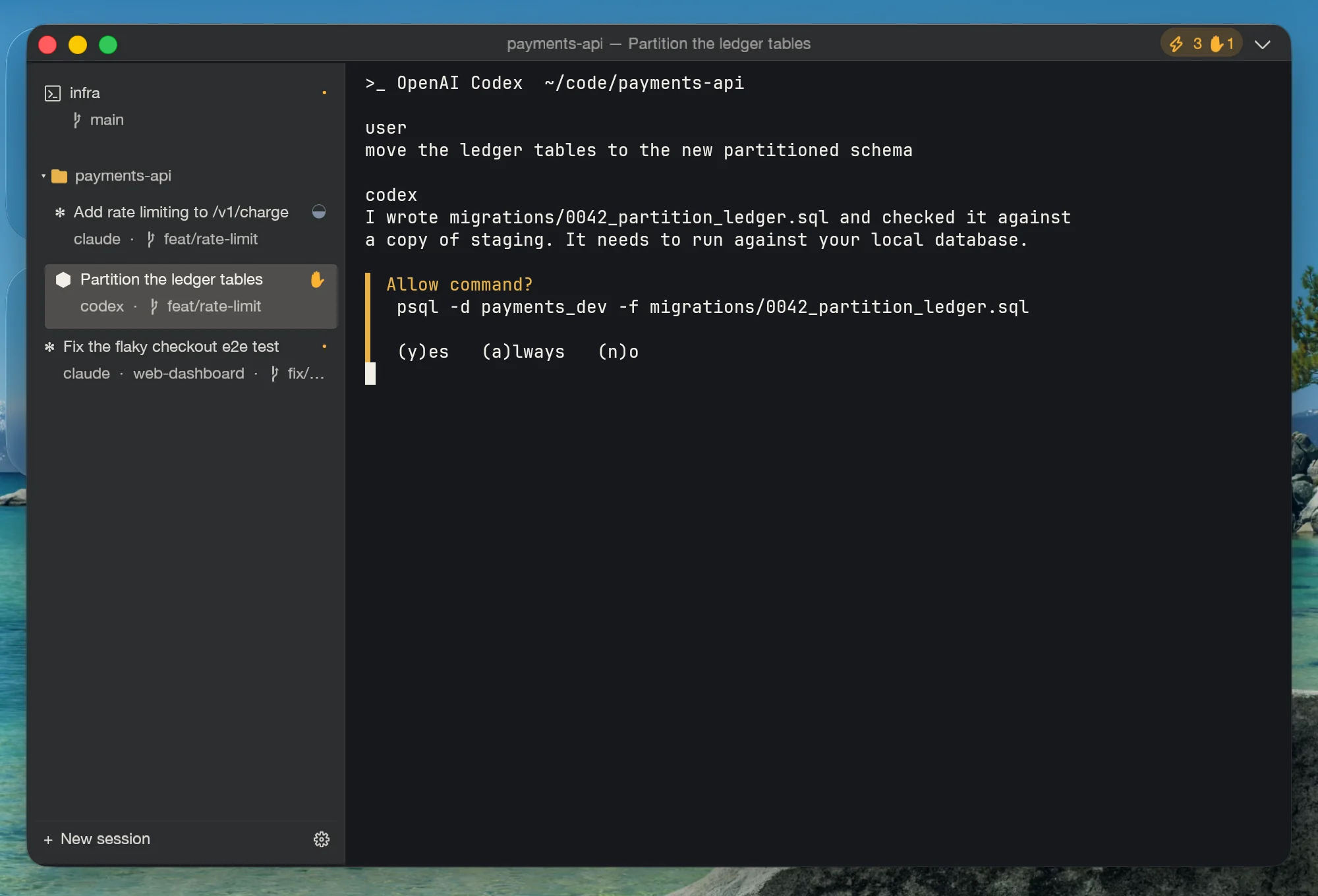
Jump straight to the prompt that is waiting, answer it, and go back to what you were doing.
Your agents can drive the terminal, too
One command registers Unterm with Claude Code, Codex, Gemini, Cursor, Windsurf and OpenCode. From then on an agent can open tabs, run commands, read the screen and wait for results — through the same 152 MCP methods and 34 CLI commands you can script yourself.
- Open a tab in the right folder and run the tests
- Read what a pane printed, or its whole history, as plain text
- Propose a command you accept with Tab — nothing typed behind your back
Writes into a shell ask for your confirmation until you trust that agent. Everything stays on 127.0.0.1.
# once: register Unterm with every agent on this machine
unterm-cli setup-ai

# what an agent (or you) can then do
P=$(unterm-cli session create --cwd ~/code/api | awk '/^Pane:/{print $2}')
unterm-cli exec wait --pane-id $P -- "npm test"
unterm-cli scrollback --pane-id $P --tail 40
unterm-cli agent inboxOne task, several agents — keep the best
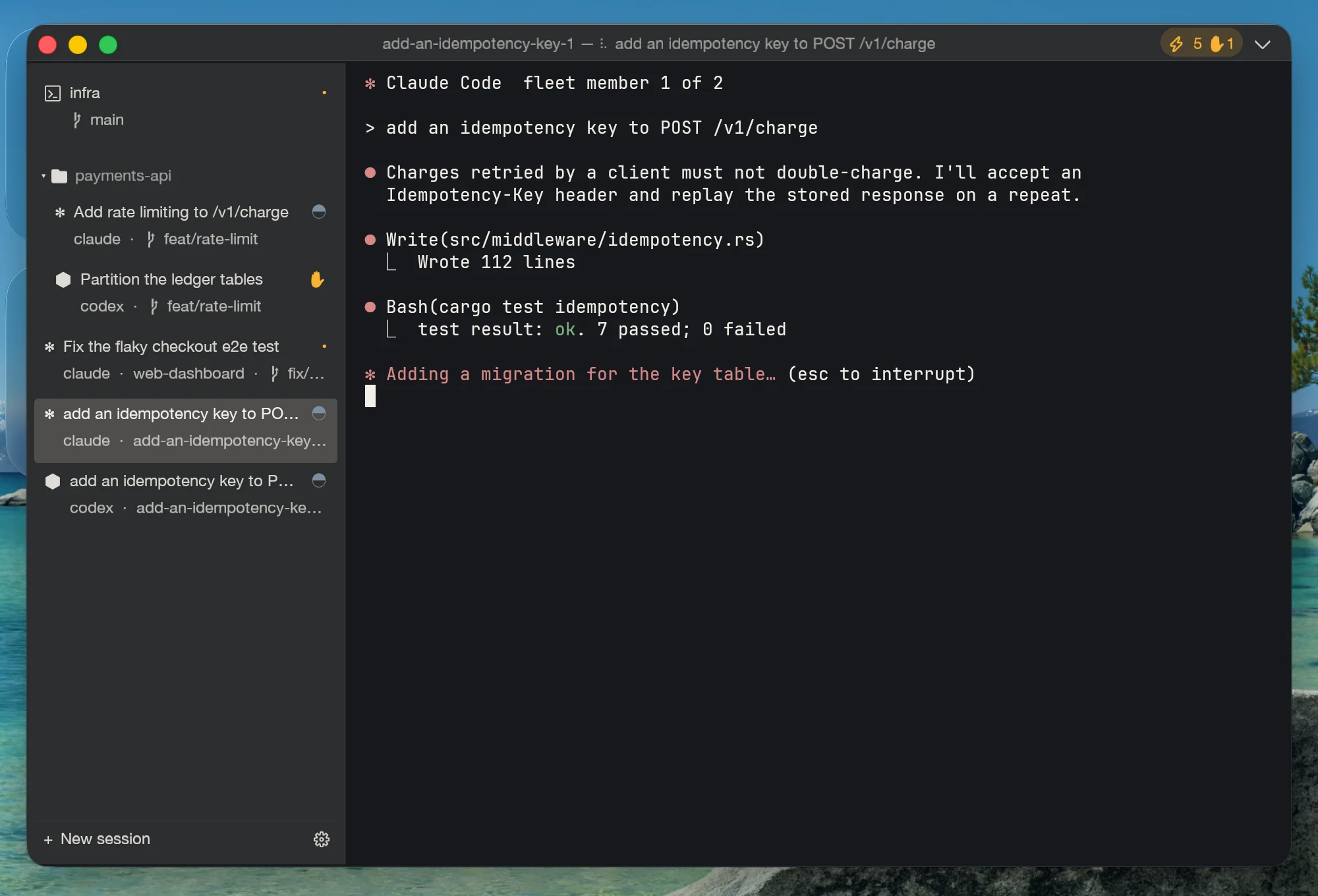
Hand the same task to Claude and Codex at once. Each works in its own git worktree, so they cannot step on each other or on you.
One command or Ctrl Shift Alt A: a worktree, a branch and a tab for each agent.
See each member's diff and run your tests inside its worktree, side by side.
The chosen work lands staged in your repo, uncommitted edits included. You write the commit.
Works with the agents you already use
Install and sign in from inside Unterm, or keep the setup you have. Your subscription stays yours.
Go further
Recipes you can paste: scripting panes, fleets, recordings, workspaces, per-project identities, raw MCP.
How it compares
| Capability | Unterm | Warp | iTerm2 | Ghostty |
|---|---|---|---|---|
| Agent Cockpit (Inbox · fleets · review) | ✓ | ~ cloud | ✗ | ✗ |
| Driveable from outside via MCP | ✓ | ✗ | ✗ | ✗ |
| Scriptable CLI for every action | ✓ | ✗ | Python API | ✗ |
| Built-in AI coding-agent launcher | ✓ ×7 | ✗ | ✗ | ✗ |
| Local-first, no cloud / no login | ✓ | ✗ | ✓ | ✓ |
| macOS + Linux + Windows | ✓ | ✓ | macOS | mac+Linux |
| Open-source client | ✓ MIT | ✗ | ✓ GPL | ✓ MIT |
| Price | $0 | freemium $ | $0 | $0 |
Download by platform
Pick the package for your system; the links go straight to GitHub Releases. macOS builds are signed and notarized. Windows installers are not code-signed yet, so SmartScreen may ask you to confirm (More info → Run anyway).
curl -fsSL https://unterm.app/install.sh | shDetects OS + arch, downloads the right artifact for the latest release. macOS gets the signed + notarized DMG into /Applications. Linux uses apt when available, falls back to the AppImage in ~/.local/bin.
Or with Homebrew (macOS):
brew install --cask zhitongblog/tap/untermOr grab the artifact directly:
Frequently asked questions
What is Unterm?
A cross-platform terminal emulator with built-in MCP, HTTP, and CLI control surfaces. The product thesis: terminal as MCP-controllable surface, so any external AI agent can drive it from outside instead of having an AI baked into the terminal itself.
How do I see when Claude Code is waiting for my approval?
Unterm tracks every pane’s agent state. When Claude Code (or Codex, Gemini, Aider) blocks on a confirmation, its tab dot turns amber, the top-bar chip turns amber with a count, and the agent moves to the top of the Agent Inbox (Ctrl+Shift+A) — Enter jumps you straight to that pane. Detection is zero-config for Claude Code and Gemini; “unterm-cli agent enable-hooks” adds exact hook-level reporting.
Can I run multiple Claude Code instances in parallel without them conflicting?
Yes — that is what fleets are for. “unterm-cli fleet launch --agents claude,claude,codex -- task” gives each member its own git worktree and branch beside your repo, so they cannot trample each other or your working copy. Each member gets its own tab with a live state badge, and the Review page compares their results side by side.
How does it work with Claude Code, Cursor, or other agents?
Each Unterm window starts a local MCP server (TCP, JSON-RPC, auth-token gated). Point your MCP client at 127.0.0.1:<port> — the port + token are written to ~/.unterm/server.json on launch. The agent can spawn shells, run commands, read pane state, capture screenshots, toggle recording, and run the Agent Cockpit (status, inbox, fleets, review). Theme, language, and config are deliberately not on MCP; change them in Web Settings, with unterm-cli, or in unterm.conf.
Where does my data go?
Nowhere external. MCP and Web Settings servers bind to 127.0.0.1 only. Session recordings land under <project>/.unterm/sessions/ with built-in redaction for tokens. There is no telemetry, no analytics, no login, no cloud round-trip. Your shell history is yours.
Is there a paid tier or premium feature?
No. Unterm is MIT-licensed; the same single binary ships every feature. No subscription, no Pro tier, no plugin marketplace, no “buy now to unlock split panes.” If you would like to support the project, the Sponsor link in the footer is the only ask.
Which platforms ship signed and notarized?
macOS: universal arm64 + x86_64 DMG signed with a Developer ID and Apple-notarized + stapled (no Gatekeeper warnings). Linux: .deb for Debian/Ubuntu and AppImage for any distro. Windows: WiX-built MSI installer and portable .zip. All published to GitHub Releases on every minor tag.
Is it open-source?
Yes — MIT licensed. The current GUI and terminal runtime use Unterm's native next-core engine, with MCP, Web Settings, recording, i18n, and release tooling in the same repository. Source at github.com/zhitongblog/unterm.
Wrote about Unterm? Share the link — it goes on the site →