
Alles, was Unterm kann
Die vollständige Liste: jede Schnittstelle, jede Fähigkeit und warum sie so gebaut ist.
What Unterm is, in 60 seconds
specs you can verify in source · refreshed each release- Latest version
- v0.71.14 · 2026-09-25 · MIT
- Bundled AI agents
- 7 signed manifests — Claude Code · Codex CLI · Gemini CLI · OpenCode · Aider · Kimi Code CLI · Trae Agent. Ed25519-verified envelope from unterm.app/api/agents/manifests; per-agent auth mode picker.
- Price
- $0 forever · no paid tier · no subscription · no in-app purchase
- Platforms
- macOS (universal) · Linux x86_64 (.deb + AppImage) · Windows 10/11 (.msi + portable .zip)
- Installer size
- DMG 50 MB · .deb 27 MB · AppImage 43 MB · MSI 43 MB
- Memory at idle
- ~110 MB resident · scales linearly with open panes
- UI languages
- 9 — en · 简体 · 繁體 · 日本語 · 한국어 · Deutsch · Français · Italiano · हिन्दी
- Control surfaces
- MCP (JSON-RPC over TCP) · HTTP Web Settings ·
unterm-cli· GUI — same JSON state for all four - Agent integrations tested
- Claude Code · Cursor · Codex CLI · custom Python / Node MCP clients — all via 1 socket, ~30 lines of code
- Data collection
- Zero telemetry · no account · no analytics · every server bound to 127.0.0.1
- Tech stack
- Rust · native next-core engine · wgpu · MCP (line-delimited JSON-RPC) · Tailwind + Alpine for Web Settings
Install every coding agent. One click each. No setup tax.
If you've ever tried to run more than one AI coding CLI side-by-side, you know the tax: npm install, OAuth flow, API key, ~/.config/<vendor>/<different format each>, env vars, profile separation. Unterm v0.18 collapses that into one settings tab + a CLI. No other terminal does this.
Install in the GUI or via CLI
Click Install on any agent card, or run unterm-cli agent install <id>. Unterm runs the right command for your platform (npm / pipx / etc.), verifies the binary lands on PATH, and re-detects automatically.
Official subscription first. BYO key stays opt-in.
Most agents ship with an official account or subscription login path (Claude Pro, ChatGPT Plus, Google AI Pro). Unterm defaults to that mode — no API key is ever silently injected. Switch to bring your own key or custom endpoint explicitly in the Configure form when you actually want per-token billing or a corporate gateway.
Ed25519-signed manifest catalog
The list of agents + their install commands isn't hard-coded into Unterm — it's a signed envelope served from unterm.app/api/agents/manifests. A compromise of the CDN can't push curl | sh to your machine; the public key is baked into every Unterm binary.
AI controls the terminal. MCP makes it real.
Most terminals embed AI inside the binary. Unterm does the opposite: keep AI outside, expose the terminal as a surface that any external agent can grip via MCP. The terminal is the thing being controlled; the agent is the thing doing the work.
One AI controls another AI through the terminal.
The outer agent owns the terminal session. It switches cwd, launches an inner coding agent in a pane, reads the logs, and keeps iterating until the repository is green.
The outer agent points the active pane at the project root so every command, log, and screenshot stays anchored to the same working directory.
It spawns a coding agent in a split pane, gives it the task, and lets that agent do the edit loop inside the terminal.
The outer agent reads test output and pane state, retries when needed, and only moves to commit or release when the terminal says the work is done.
Three ways to use Unterm
We didn't build for one workflow. The MCP surface means each persona gets the same control plane through different entry points.
Drive multiple terminal panes from Claude Code, Cursor, or your own agent. Each pane is one task; your agent picks where to type. Multi-instance NATO names (alpha, bravo, charlie…) make routing across windows trivial.
- Director / worker pattern: outer agent supervises inner agent in a pane
- Long-running watcher: kick off a build, poll until idle, decide next step
- Multi-pane orchestration: fan work across projects, aggregate results
- Recording with token redaction for review and fine-tune
Cron-friendly CLI for everything you can do in the GUI. unterm-cli ships in every release; pipe --json through anywhere downstream that wants raw JSON-RPC. Same surface for ops scripts, dashboards, runbooks.
- Auto proxy detection: macOS scutil / Windows registry / GNOME gsettings
- Headless screenshots and pane reads for incident docs
- Recording → markdown for runbook generation, PII-redacted by default
- No telemetry, no login, every server bound to 127.0.0.1
MIT-licensed, on its own next-core kernel since v0.61 (~12k lines, 10 direct dependencies), with first-class agent integration. Patches accepted on GitHub. Build it yourself; the binary CLI ships in every release. Web Settings UI is a Tailwind + Alpine SPA — fork the page, change the colors.
- Universal arm64 + x86_64 macOS binary, signed with Developer ID
- Linux .deb (apt) and AppImage (any distro)
- Windows MSI with WiX 6 + portable .zip
- 9 locales out of the box, system locale auto-detect
Four control surfaces, one engine
Every Unterm window starts a local MCP server and an HTTP settings server. Read and write the same JSON state from any of them.
Line-delimited JSON-RPC on 127.0.0.1:19876, auth-token gated. Spawn shells, read pane state, capture screenshots, control sessions.
Same surface from any shell, cron job, or script. Thin JSON-RPC client over the local MCP — no duplicated business logic.
Modern config UI in the browser, not the cell grid. Tailwind + Alpine SPA at 127.0.0.1:19877. Themes, proxy, recordings, language.
en / 简体 / 繁體 / 日本語 / 한국어 / Deutsch / Français / Italiano / हिन्दी out of the box. System locale auto-detect.
OSC 133 block-segmented markdown with built-in redaction. Recordings live in <cwd>/.unterm/sessions/.
One-click region capture from the status bar. PNG to disk, image to clipboard, path to text clipboard.
Auto-detects system settings and supports manual HTTP/SOCKS URLs, nodes, rotation, and Clash/mihomo controllers.
Built on Unterm's native next-core terminal engine with cross-platform wgpu rendering.
The complete control surface
Not a screenshot tour — the real surface every agent and script can call. 151 MCP methods across 30 namespaces, plus 37 CLI commands, all returning the same JSON.
Sieh den Live-Status jedes CLI-Agenten (arbeitet / wartet / inaktiv), springe aus der Inbox direkt zu dem, der dich braucht, starte eine Fleet aus N Agenten für eine Aufgabe in isolierten git worktrees — und reviewe, merge oder rolle zurück, was sie produziert haben. Aus der GUI, per MCP oder CLI.
Spawn, split, focus, resize, and destroy panes from outside the terminal. Type into any pane character-by-character, read its cwd, poll until idle — no keystroke simulation.
Pull live viewport text, the full scrollback as one string, cursor position, or a regex search. detect_errors flags failed commands for an agent to react to.
Run a command and stream output, run-and-wait for an exit code, send raw bytes, query status, cancel, or deliver a POSIX signal — structured results, not screen-scraping.
Install, authenticate, configure, and launch Claude Code / Codex / Gemini / OpenCode / Aider. The mcp-stdio bridge auto-wires each one back to this terminal's MCP server.
Bind a window to a developer identity — GitHub PAT, AWS keys, npm token, SSH key, git author. Credentials live in the OS vault; 7 sniffers discover existing ones read-only.
Each window is a NATO-named instance (alpha, bravo, charlie…). Enumerate every live Unterm on the machine, focus one, or retitle it — an agent routes work across windows by cwd or title.
Record any session as an asciicast, replay it, or export to OSC-133 block-segmented markdown with token redaction — each block carries its command, output, exit code, and duration.
Screenshot the screen, a window, or a drag-selected region; read the clipboard; or push a file to your own Aliyun OSS / Tencent COS / Qiniu bucket and get back a public URL — all over MCP.
Read the OS proxy state, switch between configured nodes, latency-test endpoints, or apply / clear system proxy overrides (macOS scutil · Windows registry · Linux env) — zero URL pasting.
Every agent write is logged with its identity; a write-confirmation policy gates first contact. Test policy decisions, run the built-in self-test suite, and read liveness/readiness flags.
Save the current window's full pane / tab layout, list saved layouts, and restore one — an agent can snapshot a working set and bring it back later.
meta.surface returns every MCP method (with param schemas), every CLI subcommand, and every live keybinding in one call — so an agent that just connected learns the whole API without docs.
Every method is reachable from MCP (JSON-RPC over TCP), the unterm-cli binary, the Web Settings HTTP API, and the GUI — one round-trip to meta.surface (or unterm-cli reference) returns this entire list live.
Where Unterm stands out
Three claims you can grep, build, or run yourself. No marketing fog.
v0.18 makes Unterm a one-click launcher for Claude Code, Codex CLI, Gemini CLI, OpenCode, and Aider. Each agent's install command, OAuth flow, API key, and native config file are described by a signed manifest fetched from unterm.app; the runtime drops the key into your OS keychain, writes the agent's own JSON/TOML/YAML config (preserving unknown fields), exposes Unterm itself to the agent as an MCP server, and records the session into audit — all reachable from the CLI and the new AI Agents Web Settings tab.
session.split + session.focus over MCP let an external agent (Claude Code, Cursor, your script) carve the active window left / right / up / down and hand focus to the new pane — without simulating any keystroke. Built into the Python snippet on the hero. No other terminal exposes pane geometry to outside processes this way.
Each session.input / exec.send is logged with the calling agent's identity. First write from a new agent triggers an Allow / Block / Always-allow banner. Trust persists to ~/.unterm/trusted_agents.json and is one click revocable from the Web Settings MCP tab. The status bar shows live MCP write count.
Small touches that add up
Daily-driver polish — none are headline features, but together they remove friction.
Fish-style grey prediction continues your input from any pane's shell history; → or End accepts.
Agents propose commands without touching the PTY — sit above the status bar; Tab accepts, Alt+Enter accept-and-run.
Drag-select any rectangle from the status bar; PNG to disk, image to clipboard, file path as text — all at once.
9 bundled themes; unterm-cli theme set midnight changes them all live. Status bar shows active pane's $HOME-relative cwd.
Finder right-click → Open in Unterm. Uses the AppleScript Services extension — no in-app context menu chrome.
Active identity profile (GitHub PAT / AWS keys / npm token bound to this window) shows in the status bar; click to spawn the next profile.
Reads macOS scutil / Windows registry / GNOME gsettings / env. One toggle on/off. No URL pasting.
Recordings split on shell prompt boundaries automatically. Each block has its command, output, exit code, duration — searchable.
The right press pastes. Selecting is what copies.
The whole copy-paste loop lives on the mouse, but the two halves sit on two different motions. Let go of a selection and it is already on the clipboard; press the right button and it pastes at the cursor — every time, selection or not. No context menu ever opens, nothing to dismiss.
Drag across output, or just double-click a word. The moment the button comes up the text is on the clipboard. There is no second gesture to remember and nothing to press to confirm it.
One button, one job. It pastes at the prompt whether or not something is selected. Copy from one pane, click into another, press right — command moved, zero keystrokes. An empty clipboard is a quiet no-op, never an error.
macOS treats Ctrl+click as a secondary click, and so does Unterm — trackpad, Magic Mouse, or any third-party driver. Only a bare Ctrl qualifies, so your own Ctrl-combo mouse bindings and the Ctrl+Shift window drag stay untouched. macOS delivers that one motion as two events; Unterm acts on it once. Mouse-aware TUIs like vim or Claude Code behave the same way.
Changed in v0.71.6. The press used to copy whenever something was selected — repeating work the selection had already done, at the cost of the paste it was aimed at.
Dein Terminal sieht jetzt die Agenten, die darin laufen
Claude Code, Codex, Gemini, Aider — jedes Panel meldet, wer gerade arbeitet, wer auf dich wartet und was geändert wurde. Null Konfiguration zum Start; ein Befehl für exaktes Reporting auf Hook-Ebene.
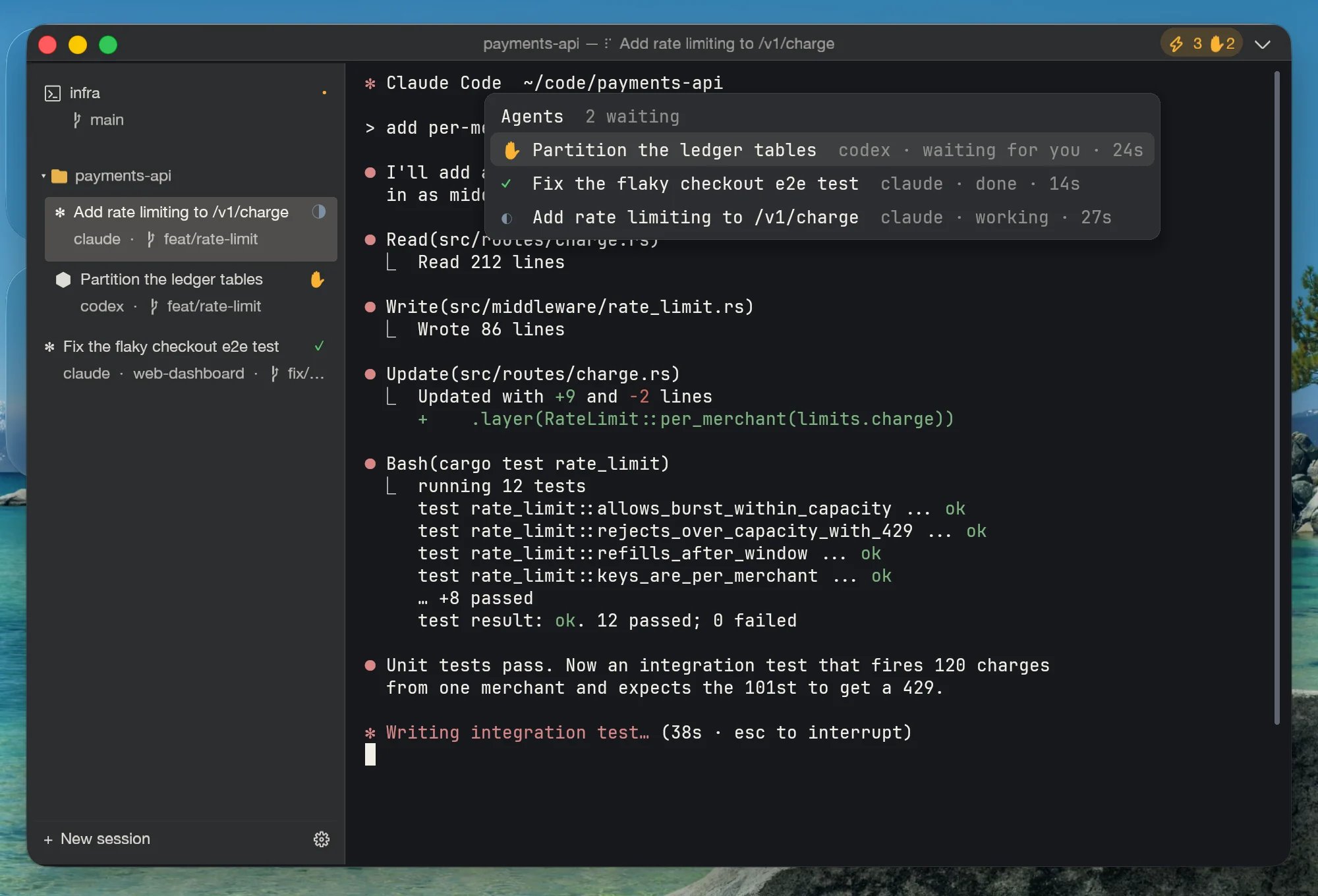
Vier Signalebenen — offizielle Hooks, Titel-/OSC-Parsing, Prozesserkennung, Bildschirm-Heuristiken — verdichten sich zu einem Status pro Panel: arbeitet (pulsierendes Blau), braucht dich (Bernstein), fertig, inaktiv. Die Top-Leiste zählt über alle Fenster hinweg und wird bernsteinfarben, sobald irgendetwas auf dich wartet.
Ctrl+Shift+A: alle Agenten über alle Fenster, Wartende zuerst, mit Angabe, wie lange und woran sie hängen. Enter springt direkt zum Panel. „Geh mal irgendwo y drücken“ sind jetzt zwei Tastendrücke.
Lass claude × 2 + codex um dieselbe Aufgabe wetteifern — jedes Mitglied in seinem eigenen git worktree samt Branch neben deinem Repository, mit eigenem Tab und eigenem Status-Badge. Deine Arbeitskopie bleibt unangetastet.
Sobald ein Agent zu arbeiten beginnt, setzt Unterm einen Checkpoint im Repository (ein dangling Commit — HEAD, Index und Dateien bleiben unberührt). Zeilengenaue Diffs inklusive vom Agenten neu erstellter Dateien, Squash-Merge als staged (der Commit bleibt deiner), Rollback zu jedem Checkpoint, Mitglieder im direkten Vergleich.
Das Cockpit selbst ist MCP + CLI: agent.status, cockpit.inbox, fleet.launch, review.merge … ein orchestrierender Agent kann Fleets starten und Diffs reviewen, ganz ohne Mensch am Steuer. Local-first — nichts davon berührt eine Cloud.
Neu in v0.71
A terminal that opens on a machine with no graphics driver, a second window in 31 ms instead of 587, shells that outlive the window they were opened in, and CJK that finally copies as text — the last eight releases, in seven cards.
Startup tried the hardware paths and stopped there. On a Windows box with no usable display driver — a VM, a clean image, a remote session — DX12 could find an adapter but not configure a surface, OpenGL had no driver to find, and the terminal refused to start with “no working GPU path”, never having asked for WARP, which ships with D3D12 and needs no driver at all. The chain now ends with a software pass. In the same release: `unterm-cli start` says so when it falls back to a second process instead of handing the window to the one already running, because that fallback costs a second GPU adapter and a shared Core; and the provider manifest now validates against the contract that reads it.
A second window used to be a second Unterm: another GPU adapter, another Core connection, 587 ms of waiting. It now opens inside the process already running, in 31 ms. Windows carry ids, so `instance.new_window` answers with the one it just made and `instance.focus` takes it; a session belongs to exactly one window, and closing a window closes the view while the shells stay in the Core for whichever window is left. Only the last window asks whether you meant to quit.
Capabilities now live behind leases: an agent acquires one, uses it under a key you can see, and loses it when you revoke — instead of every caller holding the same unbounded socket. Approvals became answerable, with the question naming what is about to happen rather than the method that happens to implement it. Fleets are stored durably rather than in a JSON file, so a crash mid-run no longer loses which member was doing what.
“Keep running in the background” now leaves something on screen — a tray indicator on all three platforms that reports how many sessions are still alive and brings a parked window back with one click. An agent can do the same over MCP: `instance.focus` wakes a parked window rather than failing at it. The two close buttons stopped disagreeing about your shells, which is what made “close” mean two different things depending on which one you pressed.
Typing CJK used to shatter into `<009d>` byte junk when the GUI handed the shell a locale it had never set. Copied text carried the grid's spacer cell instead of the text, so a paste came back with holes in it. Double-click selected half a word and lost the other half. Wide characters are one character now — in the selection, on the clipboard, and on the way in. Plus an end to the redraw storm: comparing the frame the wrong way meant repainting whether or not anything had moved.
unterm-core besitzt jetzt deine Sessions: ein Prozess pro Benutzer hält Shells, Scrollback und Split-Layouts, bedient die gesamte MCP-Oberfläche und überlebt das Schließen des Fensters (v0.62). v0.63 ist das Release, das die Installation verdient hatte: der Core-Daemon liegt wirklich in allen sechs Paketen, die Einstellungsseite funktioniert im Core-Modus, Emoji werden zum ersten Mal gerendert — die mitgelieferte Schrift war ein COLRv1-Font, den FreeType nicht zeichnen kann — die Tipp-Verzögerung nach einer Pause fiel von 96ms auf 8ms, macOS trägt das neue Zeichen, und der Explorer bekommt „Open in Unterm tab“.
Unterm läuft nicht mehr auf einem WezTerm-Fork. next-core ist ein für dieses Produkt geschriebener Terminal-Kernel — Parser, Screen-Modell, PTY-Laufzeit, Font-Stack und ein wgpu-Renderer — mit einem Budget von ~12k Quellzeilen und 10 direkten Abhängigkeiten. 22 ms vom Start bis zur live MCP-Fläche (vorher 7,1 s), im Leerlauf 6,6 % eines Kerns (vorher 80 %), identischer 200k-Zeilen-Durchsatz. Die Feature-Parität mit dem alten Kernel wurde Punkt für Punkt gegen ein Ledger mit 159 Anforderungen geschlossen, mit plattformnativer Typografie: echte Traffic Lights auf macOS, pt-genaue Größen und endlich korrekt gerendertes CJK. Die ganze Geschichte im Blog.
Five principles, no exceptions
Every server, every API endpoint, every recording lives on 127.0.0.1. No login, no telemetry, no subscription. Your shell history is yours.
No chat overlay, no ghost-text autocomplete, no inline AI panel. The terminal is the surface — Claude Code, Cursor, your scripts grip it through MCP.
Every product feature ships with an MCP method and a CLI subcommand on day one. If it can't be driven from outside, it doesn't ship.
A feature that works on Windows but bails on macOS or Linux is a bug, not a 'not yet supported.' Mac, Linux, Windows ship together.
When a feature belongs to the OS, use the OS. Keep AI generation outside the terminal, core operation local, and use native Finder integration.
When you install an AI agent through Unterm, the default authentication mode is the vendor's official subscription (OAuth) — your Pro / Plus / Team plan. We never silently inject an API key into a session; per-token billing happens only if you explicitly switch the auth mode to 'bring your own API key' or 'custom endpoint' in the Configure form. This is an opt-in, not a footgun.
A terminal doesn’t need AI built in.
It needs to be drivable by AI.
This is the fork between Unterm and Warp — not a feature gap, a direction.
A terminal is a thirty-year tool; an AI model is a six-month component. Weld the AI into the terminal and the longest-lived tool you own is now defined by its shortest-lived part — when the model ages, the whole terminal ages with it.
Claude Code, Codex, Gemini CLI, Aider — you already run the strongest coding agents there are, and they get better every month. A chat box inside the terminal is just one more copilot to sign into, and it will never be the one you actually prefer.
Agents don’t lack intelligence — they lack hands on the terminal. Unterm makes the terminal an MCP-drivable surface: spawn panes, run commands, read the screen, take scrolling screenshots, change settings, record sessions. An agent uses the terminal the way you do, instead of watching through glass.
- AI embedded in the terminal UI, tied to their cloud — login, subscription, quotas
- Their chosen models, upgraded on their schedule
- The AI core is closed; your command context flows through their servers
- The terminal is an MCP surface — any agent plugs in and drives, today’s or next year’s
- You pick the agent and the model; Unterm never locks you in
- MIT, fully open source; everything stays on 127.0.0.1 — no login, no subscription, no telemetry
You’ll still be using a terminal in thirty years. Nobody knows which AI will be driving it then — which is why the only future-proof terminal is the one built to be driven.
How Unterm differs
Three terminals reset the bar in 2026. They each picked a different lane.
| Feature | Unterm | Terminal.app | Warp | iTerm2 | Ghostty |
|---|---|---|---|---|---|
| agent-first | native | paid | free | free | |
| MCP-controllable from outside | ✓ | ✗ | ✗ | ✗ | ✗ |
| Skriptbare CLI für jede Aktion | ✓ | ✗ | ✗ | Python API | ✗ |
| Eingebauter Starter für KI-Coding-Agenten | ✓ ×7 | ✗ | ✗ | ✗ | ✗ |
| Agents auto-wire to the terminal's MCP | ✓ | ✗ | ✗ | ✗ | ✗ |
| Agenten-Cockpit (Posteingang · Fleets · Review) | ✓ | ✗ | ~ cloud | ✗ | ✗ |
| Identity profiles (creds per window) | ✓ | ✗ | ✗ | ✗ | ✗ |
| Multi-instance orchestration | ✓ | ✗ | ✗ | ✗ | ✗ |
| Session recording → markdown | ✓ md | ✗ | ~ | ✓ | ✗ |
| Screenshot + file upload from MCP | ✓ | ✗ | ✗ | ~ | ✗ |
| Right-click = copy / paste gesture | ✓ gesture | menu | menu | menu | menu |
| Built-in proxy management | ✓ | ✗ | ✗ | ✗ | ✗ |
| Local-first, no cloud | ✓ | ✓ | ✗ | ✓ | ✓ |
| AI inside the terminal | ✗ (by design) | ✗ | ✓ (cloud) | plugin | ✗ |
| GPU rendering | ✓ | ✗ | ✓ | ✓ | ✓ |
| macOS + Linux + Windows | ✓ | ✗ | ✓ | macOS | mac+Linux |
| Open-source client | ✓ MIT | ✗ | ✗ | ✓ GPL | ✓ MIT |
| 9-language native UI | ✓ ×9 | OS | en | en | en |
| Preis | $0 | $0 | Freemium $ | $0 | $0 |
✓ yes · ✗ no · ~ partial · ×N count. The ✗ by design on "AI inside" is the whole thesis: Unterm keeps the AI outside and exposes the terminal as the surface it grips.
Comparison reflects publicly documented features as of 2026-05-01. Other terminals may have closed-source or roadmap items not listed.
Vollständige Direktvergleiche:
Häufige Fragen
What is Unterm?
A cross-platform terminal emulator with built-in MCP, HTTP, and CLI control surfaces. The product thesis: terminal as MCP-controllable surface, so any external AI agent can drive it from outside instead of having an AI baked into the terminal itself.
Wie sehe ich, wann Claude Code auf meine Freigabe wartet?
Unterm verfolgt den Agent-Status jedes Panels. Wenn Claude Code (oder Codex, Gemini, Aider) auf eine Bestätigung wartet, wird der Punkt seines Tabs bernsteinfarben, der Chip in der Top-Leiste wird bernsteinfarben mit Zähler, und der Agent rückt an die Spitze der Agent-Inbox (Ctrl+Shift+A) — Enter springt direkt zum Panel. Die Erkennung funktioniert für Claude Code und Gemini ohne Konfiguration; „unterm-cli agent enable-hooks“ ergänzt exaktes Reporting auf Hook-Ebene.
Kann ich mehrere Claude-Code-Instanzen parallel laufen lassen, ohne dass sie sich in die Quere kommen?
Ja — genau dafür gibt es Fleets. „unterm-cli fleet launch --agents claude,claude,codex -- Aufgabe“ gibt jedem Mitglied einen eigenen git worktree samt Branch neben deinem Repository, sodass sie weder einander noch deine Arbeitskopie zertrampeln können. Jedes Mitglied bekommt einen eigenen Tab mit Live-Status-Badge, und die Review-Seite vergleicht die Ergebnisse nebeneinander.
Wie reviewe ich, was ein KI-Coding-Agent geändert hat, oder mache es rückgängig?
Unterm setzt einen Checkpoint, sobald ein Agent in einem Repository zu arbeiten beginnt — ein dangling git Commit, der HEAD, deinen Index und deine Dateien nie berührt. Die Review-Seite (in den Web-Einstellungen) zeigt zeilengenaue Diffs inklusive der vom Agenten neu erstellten Dateien und lässt dich ein Ergebnis per Squash-Merge als staged Änderungen in dein Repository übernehmen (den Commit machst du), es verwerfen oder den worktree zu jedem beliebigen Checkpoint zurückrollen.
Welche KI-Coding-Agenten unterstützt Unterm?
Der Launcher installiert und verdrahtet Claude Code, Codex CLI, Gemini CLI, OpenCode und Aider mit je einem Klick. Die Statuserkennung des Cockpits erkennt zusätzlich kimi, trae und cursor-agent von Haus aus, und jeder Agent, der Standard-Terminalsignale sendet (Titel, OSC 9/777, BEL), bekommt Basis-Tracking gratis. Alles Weitere lässt sich über „unterm-cli agent signal“ integrieren.
How do I copy and paste with just the mouse?
Right-click does both: with a selection it copies (and clears the highlight); without one it pastes at the cursor. On macOS, Ctrl+click is the same gesture. Inside terminal apps that take over the mouse (vim, htop, Claude Code), select with Shift+drag and a plain right-click still copies; without a selection the app keeps its own right-click — hold Shift to force Unterm's paste. There is no context menu to dismiss, and an empty clipboard is a quiet no-op.
How does it work with Claude Code, Cursor, or other agents?
Each Unterm window starts a local MCP server (TCP, JSON-RPC, auth-token gated). Point your MCP client at 127.0.0.1:<port> — the port + token are written to ~/.unterm/server.json on launch. The agent can spawn shells, run commands, read pane state, capture screenshots, toggle recording, and switch settings.
How do I drive multiple Unterm windows from one agent?
Each Unterm process is one instance with a NATO-phonetic name (alpha, bravo, …) recorded in ~/.unterm/instances/<name>.json. Call instance.list on any one of them to enumerate; pick by cwd / title / start order; connect to that instance's port with its auth token. ~/.unterm/active.json points at the most recent live instance for single-instance fallbacks.
How is this different from Warp?
Warp embeds AI inside a closed cloud orchestrator (Oz) — external tools like Claude Code can't drive Warp from outside. Unterm picks the third lane: keep AI out of the terminal, expose the terminal itself as an MCP-controllable surface, and let any agent grip it. No cloud, no login.
Where does my data go?
Nowhere external. MCP and Web Settings servers bind to 127.0.0.1 only. Session recordings land under <project>/.unterm/sessions/ with built-in redaction for tokens. There is no telemetry, no analytics, no login, no cloud round-trip. Your shell history is yours.
Does Unterm phone home, even once?
No. Zero telemetry by default — not even an opt-in dialog. The only outbound HTTP requests Unterm makes are: (1) at user request, when you click a download link in Web Settings; (2) by your shell, like normal — anything your terminal would do, it still does. We don't ship analytics, error reporting, install pings, or update checks.
Gibt es eine kostenpflichtige Version oder Premium-Funktionen?
Nein. Unterm steht unter MIT-Lizenz; dieselbe Binärdatei enthält alle Funktionen. Kein Abo, keine Pro-Stufe, kein Plugin-Marktplatz, kein „jetzt kaufen, um geteilte Panes freizuschalten“. Wer das Projekt unterstützen möchte: der Link „Unterstützen“ in der Fußzeile ist die einzige Bitte.
How big is the install and runtime?
macOS DMG ~50 MB · Linux .deb 27 MB · AppImage 43 MB · Windows MSI 43 MB. At idle with one window open, resident memory is ~110 MB; scales linearly per pane. The native next-core engine renders through wgpu; runtime cost is normally dominated by the shell and applications in each pane.
Does Unterm detect my system language?
Yes. On first launch, Unterm reads the OS locale (defaults on macOS, $LANG on Linux, registry on Windows) and picks the closest of 9 bundled UI languages. You can override per window in Web Settings → Language. Translations live in unterm-services/src/i18n/locales/*.json — patches welcome.
What stops a rogue agent from running rm -rf on my repo?
Three gates: (1) MCP server only listens on 127.0.0.1 — no network access. (2) Auth-token gated; the token is in ~/.unterm/instances/<name>.json, an agent without read access to that file can't even connect. (3) First write from a new agent triggers a blocking Allow / Block / Always-allow banner; the audit log records every write attempt with calling agent's identity. You can revoke trust at any time from the Web Settings MCP tab.
How do I script it?
Use unterm-cli: session list, proxy status, theme set midnight, session record start, screenshot. Pass --json to any subcommand for raw JSON-RPC output suitable for shell pipelines and cron jobs.
Which platforms ship signed and notarized?
macOS: universal arm64 + x86_64 DMG signed with a Developer ID and Apple-notarized + stapled (no Gatekeeper warnings). Linux: .deb for Debian/Ubuntu and AppImage for any distro. Windows: WiX-built MSI installer and portable .zip. All published to GitHub Releases on every minor tag.
Is it open-source?
Yes — MIT licensed. The current GUI and terminal runtime use Unterm's native next-core engine. Source at github.com/zhitongblog/unterm.
How do I contribute?
Open an issue or PR on GitHub. The project tracks bugs, feature requests, and discussion in one queue. We bundle accumulated fixes into minor releases — patch-level versions don't trigger CI builds. Documentation lives in-repo at /docs.
Support Unterm
One developer builds and maintains Unterm in their spare time. If it speeds up your daily work, a small sponsorship keeps the project alive.
International monthly or one-time tier. Processed by Stripe via GitHub. Cancelable any time.
Worldwide one-time tip. Choose any amount in your local currency.
Sponsors get listed in the README and the in-app About dialog (with permission). No paywall, no premium tier — everything ships in the same MIT-licensed binary.
Community & contact
Open queue, no gatekeeping. The right place for your question depends on what kind of question it is.
Bug reports, feature requests, regressions. The triage queue is single — every report gets read.
Questions about MCP integration patterns, agent setup, workflow design. Other users may have hit the same thing.
Direct line for security issues, partnerships, or anything that doesn't fit a public forum.