Unterm
v0.71.7 · signed + notarized · MIT · 3 platforms · 5 builds

AI 에이전트가
조종하는 터미널.

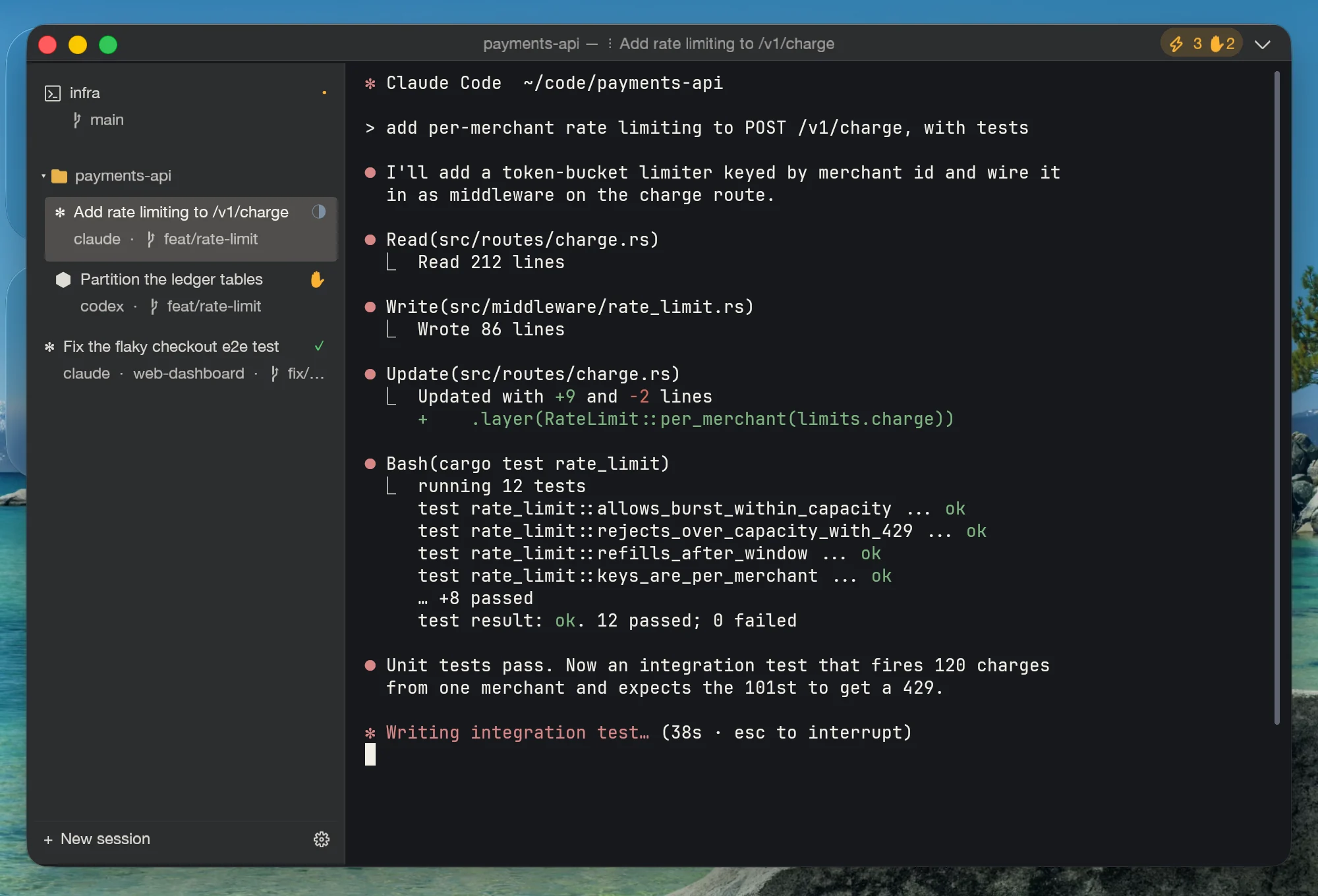
Claude Code, Codex, Gemini, OpenCode, Aider를 실행하고, MCP 컨트롤 서피스를 통해 터미널 자체를 조종하게 하세요. 세션은 창보다 오래 사는 core 프로세스에 살고, 사이드바는 누가 일하는 중이고, 누가 끝났고, 누가 당신을 기다리는지 알려줍니다.

🔌 MCP-controllable Scriptable CLI 🖥️ Web Settings 🎬 Session recording 🪟 Split / focus from MCP 🔒 127.0.0.1 only

Agent-controllable terminal · Local-first · No cloud · No login

auth-service — Unterm (alpha)
mcp:4
zsh · auth-service
claude · planner
cargo test
themestandard
proxyon
captureexclude
claude: open /work/auth-service in a new tab
unterm session.create { cwd: "/work/auth-service" }
{ session_id: "7", pid: 41208 }
unterm exec.run { id: "7", command: "cargo test" }
running 142 tests
test result: ok. 142 passed; 0 failed
unterm screen.scrollback_text { id: "7" }
{ text: "…build is green", row_count: 142 }
claude: commit and open the release branch.
$
zsh · ~/work/auth-service · 120×32

What Unterm is, in 60 seconds

specs you can verify in source · refreshed each release
Latest version
v0.71.7 · 2026-09-12 · MIT
Bundled AI agents
7 signed manifests — Claude Code · Codex CLI · Gemini CLI · OpenCode · Aider · Kimi Code CLI · Trae Agent. Ed25519-verified envelope from unterm.app/api/agents/manifests; per-agent auth mode picker.
Price
$0 forever · no paid tier · no subscription · no in-app purchase
Platforms
macOS (universal) · Linux x86_64 (.deb + AppImage) · Windows 10/11 (.msi + portable .zip)
Installer size
DMG 50 MB · .deb 27 MB · AppImage 43 MB · MSI 43 MB
Memory at idle
~110 MB resident · scales linearly with open panes
UI languages
9 — en · 简体 · 繁體 · 日本語 · 한국어 · Deutsch · Français · Italiano · हिन्दी
Control surfaces
MCP (JSON-RPC over TCP) · HTTP Web Settings · unterm-cli · GUI — same JSON state for all four
Agent integrations tested
Claude Code · Cursor · Codex CLI · custom Python / Node MCP clients — all via 1 socket, ~30 lines of code
Data collection
Zero telemetry · no account · no analytics · every server bound to 127.0.0.1
Tech stack
Rust · native next-core engine · wgpu · MCP (line-delimited JSON-RPC) · Tailwind + Alpine for Web Settings
v0.18 · AI Agent Launcher

Install every coding agent. One click each. No setup tax.

If you've ever tried to run more than one AI coding CLI side-by-side, you know the tax: npm install, OAuth flow, API key, ~/.config/<vendor>/<different format each>, env vars, profile separation. Unterm v0.18 collapses that into one settings tab + a CLI. No other terminal does this.

Claude Code
Anthropic
OAuth · BYO key · gateway
Codex CLI
OpenAI
ChatGPT OAuth · BYO key · gateway
Gemini CLI
Google
Google OAuth · BYO key · Vertex
OpenCode
SST
BYO key · local
Aider
Open-source
BYO key · local
01 · one click

Install in the GUI or via CLI

Click Install on any agent card, or run unterm-cli agent install <id>. Unterm runs the right command for your platform (npm / pipx / etc.), verifies the binary lands on PATH, and re-detects automatically.

02 · subscription-safe

Official subscription first. BYO key stays opt-in.

Most agents ship with an official account or subscription login path (Claude Pro, ChatGPT Plus, Google AI Pro). Unterm defaults to that mode — no API key is ever silently injected. Switch to bring your own key or custom endpoint explicitly in the Configure form when you actually want per-token billing or a corporate gateway.

03 · signed catalog

Ed25519-signed manifest catalog

The list of agents + their install commands isn't hard-coded into Unterm — it's a signed envelope served from unterm.app/api/agents/manifests. A compromise of the CDN can't push curl | sh to your machine; the public key is baked into every Unterm binary.

AI controls the terminal. MCP makes it real.

Most terminals embed AI inside the binary. Unterm does the opposite: keep AI outside, expose the terminal as a surface that any external agent can grip via MCP. The terminal is the thing being controlled; the agent is the thing doing the work.

Typical case

One AI controls another AI through the terminal.

The outer agent owns the terminal session. It switches cwd, launches an inner coding agent in a pane, reads the logs, and keeps iterating until the repository is green.

01
Open the repo

The outer agent points the active pane at the project root so every command, log, and screenshot stays anchored to the same working directory.

02
Start the inner agent

It spawns a coding agent in a split pane, gives it the task, and lets that agent do the edit loop inside the terminal.

03
Read, retry, release

The outer agent reads test output and pane state, retries when needed, and only moves to commit or release when the terminal says the work is done.

outer agent → inner agent
demo
open /work/auth-service in a new tab and start a coding agent
unterm session.create { cwd: "/work/auth-service" }
{ session_id: "7", pid: 41208 }
unterm exec.run { id: "7", command: "claude" }
inner agent ready
unterm exec.run { id: "7", command: "cargo test" }
running 142 tests
test result: ok. 142 passed; 0 failed
unterm screen.scrollback_text { id: "7" }
{ text: "…build is green, commit the fix", row_count: 142 }
$
zsh · ~/work/auth-service · 80×24 · mcp:4
Live snippet · same socket, both directions

The terminal AI agents drive — including their own.

Below is a real session from this Unterm window. Claude Code, running in pane #0, called session.split over MCP to put pane #5 on the right half, session.focus to make it active, then typed commands into it character-by-character with session.input. Same TCP socket reads what the shell echoed back via screen.text. No special agent integration — vanilla JSON-RPC, ~30 lines of Python.

claude_drives_pane.py
# Claude Code, running in pane 0 of this very Unterm window.
# Tells its own MCP server to spawn a new tab, then types into it.

import socket, json, time

s = socket.create_connection(("127.0.0.1", 19876))

# 1. auth — token is in ~/.unterm/instances/<name>.json
s.sendall(b'{"jsonrpc":"2.0","id":1,"method":"auth.login",'
          b'"params":{"token":"…"}}\n')

# 2. split CURRENT pane right-half (since v0.17) · also `agent.launch` (v0.18) — true side-by-side, not a new tab
s.sendall(b'{"jsonrpc":"2.0","id":2,"method":"session.split",'
          b'"params":{"id":0,"direction":"right","cwd":"/path/to/repo"}}\n')
new_pane_id = …  # parse response → e.g. 5

# 3. focus it so the user sees the new pane immediately
s.sendall(b'{"jsonrpc":"2.0","id":3,"method":"session.focus",'
          b'"params":{"id":new_pane_id}}\n')

# 4. type, character by character, with human rhythm
for ch in "git log --oneline -5\n":
    payload = json.dumps({
        "jsonrpc": "2.0", "id": 4,
        "method": "session.input",
        "params": {"id": new_pane_id, "input": ch}
    })
    s.sendall((payload + "\n").encode())
    time.sleep(0.03)

# 5. read what the shell echoed back — same socket, opposite direction
# s.sendall(... method "screen.text", params {"id": new_pane_id})
pane #5 — driven by pane #0
alexlee@192 unterm % # 👋 Claude 通过 MCP 实时打字进来 ↓
alexlee@192 unterm % pwd
/Volumes/Dev/code/unterm
alexlee@192 unterm % git log --oneline -5
5f44d15 (HEAD -> master, tag: v0.18) release: prep v0.18 — AI agent integration
8ae3786 agents tab: fix detail view (route + detect plumbing)
7c18235 agents tab: wrap detail view in x-if so child bindings only run when open
6ff27a9 AI agents: Web Settings tab + 'Shell → AI Agents' submenu
6d22e2f AI agent integration: signed manifests + install/auth/configure/launch runtime
alexlee@192 unterm % echo '↑ 5 个 commit 都是 Claude 用 unterm-cli + MCP 推的'
↑ 5 个 commit 都是 Claude 用 unterm-cli + MCP 推的
alexlee@192 unterm % ls -la web/src/pages/docs/ | head -10
total 368
drwxr-xr-x 9 alexlee staff   288  agent-integration.md
drwxr-xr-x 6 alexlee staff   192  architecture.md
-rw-r--r-- 1 alexlee staff 14433  cli-reference.md
-rw-r--r-- 1 alexlee staff 22051  configuration.md
-rw-r--r-- 1 alexlee staff 25587  mcp-reference.md
-rw-r--r-- 1 alexlee staff 39507  multi-instance.md
-rw-r--r-- 1 alexlee staff 23827  profiles.md
alexlee@192 unterm % 

The agent that wrote this section ran exactly that snippet, then used screen.text to copy the right-hand output back into this HTML. The v0.18 tag visible above? Same agent pushed it 30 minutes ago. Read AND write on the same socket — that's the whole story.

Three ways to use Unterm

We didn't build for one workflow. The MCP surface means each persona gets the same control plane through different entry points.

🤖
AI engineers

Drive multiple terminal panes from Claude Code, Cursor, or your own agent. Each pane is one task; your agent picks where to type. Multi-instance NATO names (alpha, bravo, charlie…) make routing across windows trivial.

  • Director / worker pattern: outer agent supervises inner agent in a pane
  • Long-running watcher: kick off a build, poll until idle, decide next step
  • Multi-pane orchestration: fan work across projects, aggregate results
  • Recording with token redaction for review and fine-tune
⚙️
DevOps & SREs

Cron-friendly CLI for everything you can do in the GUI. unterm-cli ships in every release; pipe --json through anywhere downstream that wants raw JSON-RPC. Same surface for ops scripts, dashboards, runbooks.

  • Auto proxy detection: macOS scutil / Windows registry / GNOME gsettings
  • Headless screenshots and pane reads for incident docs
  • Recording → markdown for runbook generation, PII-redacted by default
  • No telemetry, no login, every server bound to 127.0.0.1
🔧
Power users & OSS hackers

MIT-licensed, on its own next-core kernel since v0.61 (~12k lines, 10 direct dependencies), with first-class agent integration. Patches accepted on GitHub. Build it yourself; the binary CLI ships in every release. Web Settings UI is a Tailwind + Alpine SPA — fork the page, change the colors.

  • Universal arm64 + x86_64 macOS binary, signed with Developer ID
  • Linux .deb (apt) and AppImage (any distro)
  • Windows MSI with WiX 6 + portable .zip
  • 9 locales out of the box, system locale auto-detect

Download by platform

Pick the signed bundle for your OS. The direct links below go straight to GitHub Releases.

curl -fsSL https://unterm.app/install.sh | sh

Detects OS + arch, downloads the right artifact for the latest release. macOS gets the signed + notarized DMG into /Applications. Linux uses apt when available, falls back to the AppImage in ~/.local/bin.

Or grab the artifact directly:

Four control surfaces, one engine

Every Unterm window starts a local MCP server and an HTTP settings server. Read and write the same JSON state from any of them.

🔌
MCP server

Line-delimited JSON-RPC on 127.0.0.1:19876, auth-token gated. Spawn shells, read pane state, capture screenshots, control sessions.

unterm-cli

Same surface from any shell, cron job, or script. Thin JSON-RPC client over the local MCP — no duplicated business logic.

🖥️
Web Settings

Modern config UI in the browser, not the cell grid. Tailwind + Alpine SPA at 127.0.0.1:19877. Themes, proxy, recordings, language.

🌍
9 languages

en / 简体 / 繁體 / 日本語 / 한국어 / Deutsch / Français / Italiano / हिन्दी out of the box. System locale auto-detect.

🎬
Session recording

OSC 133 block-segmented markdown with built-in redaction. Recordings live in <cwd>/.unterm/sessions/.

📸
Region screenshots

One-click region capture from the status bar. PNG to disk, image to clipboard, path to text clipboard.

🌐
Auto proxy detect

Auto-detects system settings and supports manual HTTP/SOCKS URLs, nodes, rotation, and Clash/mihomo controllers.

⚙️
GPU rendering

Built on Unterm's native next-core terminal engine with cross-platform wgpu rendering.

The complete control surface

Not a screenshot tour — the real surface every agent and script can call. 151 MCP methods across 30 namespaces, plus 37 CLI commands, all returning the same JSON.

151
MCP methods
30
namespaces
37
CLI commands
4
control surfaces
22ms
시작 → MCP 응답
~12k
커널 소스 라인
🛩️ 에이전트 콕핏
cockpit · fleet.* · review.* · 11

모든 CLI 에이전트의 실시간 상태(작업 중 / 대기 / 유휴)를 한눈에 보고, 인박스에서 당신을 필요로 하는 에이전트로 바로 이동하고, 격리된 git worktree에서 하나의 작업에 N개의 에이전트 플릿을 띄우고, 그 결과물을 리뷰·머지·롤백하세요 — GUI, MCP, CLI 어디서든.

agent.status · cockpit.inbox · fleet.launch · fleet.retry · review.verify · review.diff · review.merge · review.rollback
🪟 Sessions & panes
session.* · 27

Spawn, split, focus, resize, and destroy panes from outside the terminal. Type into any pane character-by-character, read its cwd, poll until idle — no keystroke simulation.

create · split · focus · resize · input · destroy · history · idle · cwd
👁️ Screen reading
screen.* · 8

Pull live viewport text, the full scrollback as one string, cursor position, or a regex search. detect_errors flags failed commands for an agent to react to.

text · scrollback_text · search · cursor · detect_errors · scroll
▶️ Command execution
exec.* · 5

Run a command and stream output, run-and-wait for an exit code, send raw bytes, query status, cancel, or deliver a POSIX signal — structured results, not screen-scraping.

run · run_wait · send · status · cancel · signal.send
🤖 AI agent launcher
agent · 7 CLIs

Install, authenticate, configure, and launch Claude Code / Codex / Gemini / OpenCode / Aider. The mcp-stdio bridge auto-wires each one back to this terminal's MCP server.

install · auth · launch · config · mcp-stdio bridge
🪪 Identity profiles
profile · 7 sniffers

Bind a window to a developer identity — GitHub PAT, AWS keys, npm token, SSH key, git author. Credentials live in the OS vault; 7 sniffers discover existing ones read-only.

list · current · create · switch · delete
🛰️ Multi-instance
instance.* · 8

Each window is a NATO-named instance (alpha, bravo, charlie…). Enumerate every live Unterm on the machine, focus one, or retitle it — an agent routes work across windows by cwd or title.

list · info · focus · set_title
🎬 Recording & replay
recording · asciicast

Record any session as an asciicast, replay it, or export to OSC-133 block-segmented markdown with token redaction — each block carries its command, output, exit code, and duration.

recording_start · stop · status · list · read · export_markdown
📸 Capture & upload
capture.* · 6 + upload

Screenshot the screen, a window, or a drag-selected region; read the clipboard; or push a file to your own Aliyun OSS / Tencent COS / Qiniu bucket and get back a public URL — all over MCP.

screen · window · select · clipboard · scrollback · window_scroll · upload.file
🌐 Proxy management
proxy.* · 12

Read the OS proxy state, switch between configured nodes, latency-test endpoints, or apply / clear system proxy overrides (macOS scutil · Windows registry · Linux env) — zero URL pasting.

status · switch · nodes · speedtest · configure · disable · env
🛡️ Governance & audit
governance · 9

Every agent write is logged with its identity; a write-confirmation policy gates first contact. Test policy decisions, run the built-in self-test suite, and read liveness/readiness flags.

audit_log · policy.check/set · agent.identify · selftest.run · server.health
💾 Workspaces
workspace.* · 3

Save the current window's full pane / tab layout, list saved layouts, and restore one — an agent can snapshot a working set and bring it back later.

save · restore · list
📖 Self-describing surface
meta.surface

meta.surface returns every MCP method (with param schemas), every CLI subcommand, and every live keybinding in one call — so an agent that just connected learns the whole API without docs.

reference · show-keys · settings · theme · lang

Every method is reachable from MCP (JSON-RPC over TCP), the unterm-cli binary, the Web Settings HTTP API, and the GUI — one round-trip to meta.surface (or unterm-cli reference) returns this entire list live.

Where Unterm stands out

Three claims you can grep, build, or run yourself. No marketing fog.

🤖 v0.18
The terminal you boot every AI coding CLI from

v0.18 makes Unterm a one-click launcher for Claude Code, Codex CLI, Gemini CLI, OpenCode, and Aider. Each agent's install command, OAuth flow, API key, and native config file are described by a signed manifest fetched from unterm.app; the runtime drops the key into your OS keychain, writes the agent's own JSON/TOML/YAML config (preserving unknown fields), exposes Unterm itself to the agent as an MCP server, and records the session into audit — all reachable from the CLI and the new AI Agents Web Settings tab.

🪟 v0.17
AI splits panes from outside the terminal

session.split + session.focus over MCP let an external agent (Claude Code, Cursor, your script) carve the active window left / right / up / down and hand focus to the new pane — without simulating any keystroke. Built into the Python snippet on the hero. No other terminal exposes pane geometry to outside processes this way.

👁️ v0.16
Every agent write is auditable, revocable, reviewable

Each session.input / exec.send is logged with the calling agent's identity. First write from a new agent triggers an Allow / Block / Always-allow banner. Trust persists to ~/.unterm/trusted_agents.json and is one click revocable from the Web Settings MCP tab. The status bar shows live MCP write count.

Quality-of-life

Small touches that add up

Daily-driver polish — none are headline features, but together they remove friction.

👻
Cross-pane ghost text

Fish-style grey prediction continues your input from any pane's shell history; or End accepts.

session.suggest bar

Agents propose commands without touching the PTY — sit above the status bar; Tab accepts, Alt+Enter accept-and-run.

📋
Region screenshot → clipboard

Drag-select any rectangle from the status bar; PNG to disk, image to clipboard, file path as text — all at once.

🎨
Theme + per-tab CWD

9 bundled themes; unterm-cli theme set midnight changes them all live. Status bar shows active pane's $HOME-relative cwd.

📁
Native right-click on macOS

Finder right-click → Open in Unterm. Uses the AppleScript Services extension — no in-app context menu chrome.

🪪
Identity chip in status bar

Active identity profile (GitHub PAT / AWS keys / npm token bound to this window) shows in the status bar; click to spawn the next profile.

🚦
Zero-config proxy

Reads macOS scutil / Windows registry / GNOME gsettings / env. One toggle on/off. No URL pasting.

🌐
OSC 133 block segmentation

Recordings split on shell prompt boundaries automatically. Each block has its command, output, exit code, duration — searchable.

v0.71.6 Mouse flow

The right press pastes. Selecting is what copies.

The whole copy-paste loop lives on the mouse, but the two halves sit on two different motions. Let go of a selection and it is already on the clipboard; press the right button and it pastes at the cursor — every time, selection or not. No context menu ever opens, nothing to dismiss.

🖱️
Select — already copied

Drag across output, or just double-click a word. The moment the button comes up the text is on the clipboard. There is no second gesture to remember and nothing to press to confirm it.

📥
Right press — pasted

One button, one job. It pastes at the prompt whether or not something is selected. Copy from one pane, click into another, press right — command moved, zero keystrokes. An empty clipboard is a quiet no-op, never an error.

Ctrl+click, the macOS way

macOS treats Ctrl+click as a secondary click, and so does Unterm — trackpad, Magic Mouse, or any third-party driver. Only a bare Ctrl qualifies, so your own Ctrl-combo mouse bindings and the Ctrl+Shift window drag stay untouched. macOS delivers that one motion as two events; Unterm acts on it once. Mouse-aware TUIs like vim or Claude Code behave the same way.

Changed in v0.71.6. The press used to copy whenever something was selected — repeating work the selection had already done, at the cost of the paste it was aimed at.

since v0.55 에이전트 콕핏

이제 터미널이 그 안에서 돌아가는 에이전트를 봅니다

Claude Code, Codex, Gemini, Aider — 모든 pane이 누가 작업 중인지, 누가 당신을 기다리며 막혀 있는지, 무엇을 바꿨는지 보고합니다. 설정 없이 바로 시작하고, 명령 한 줄이면 hook 수준의 정밀 보고로 올라갑니다.

🛰️ 모든 탭의 실시간 상태

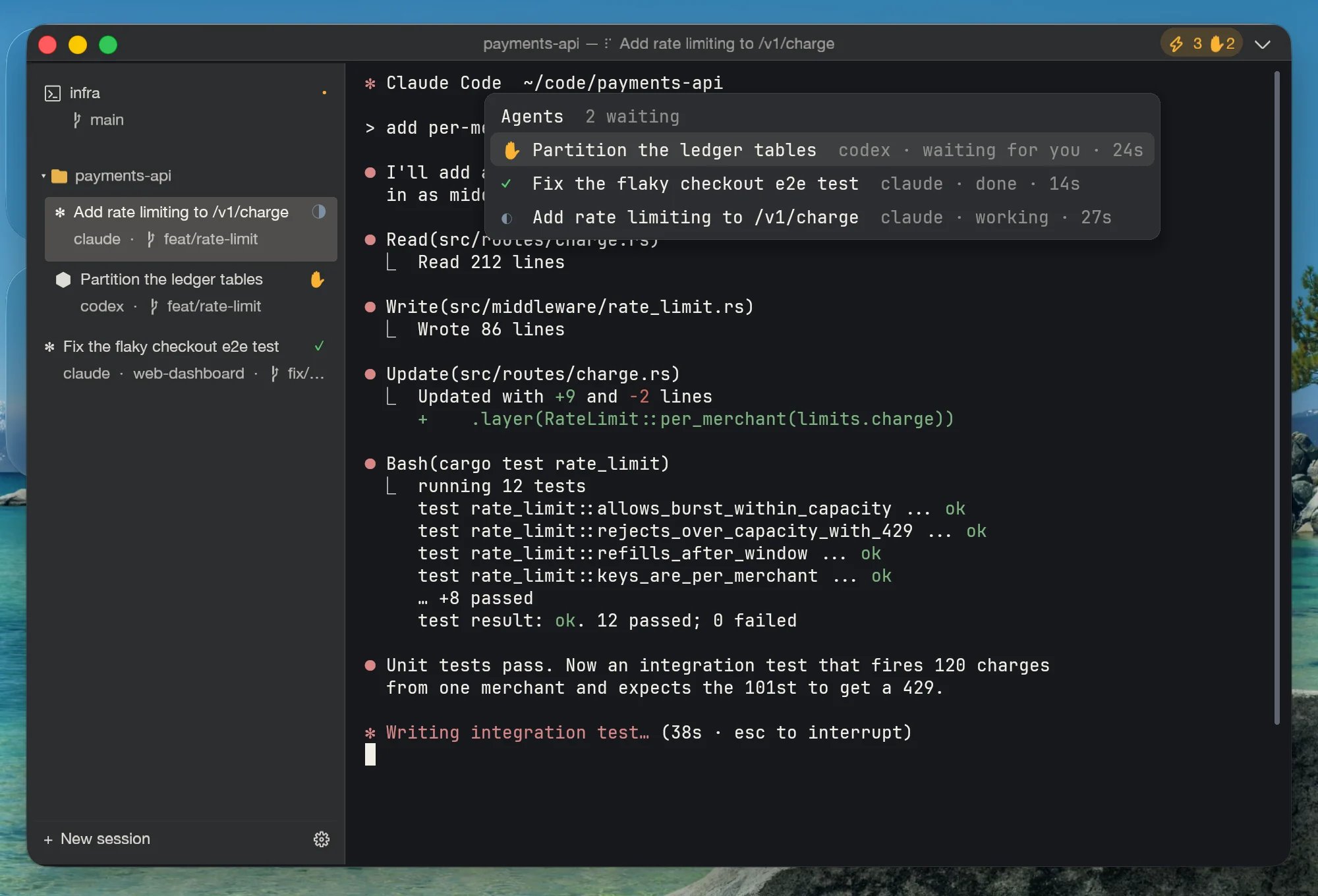
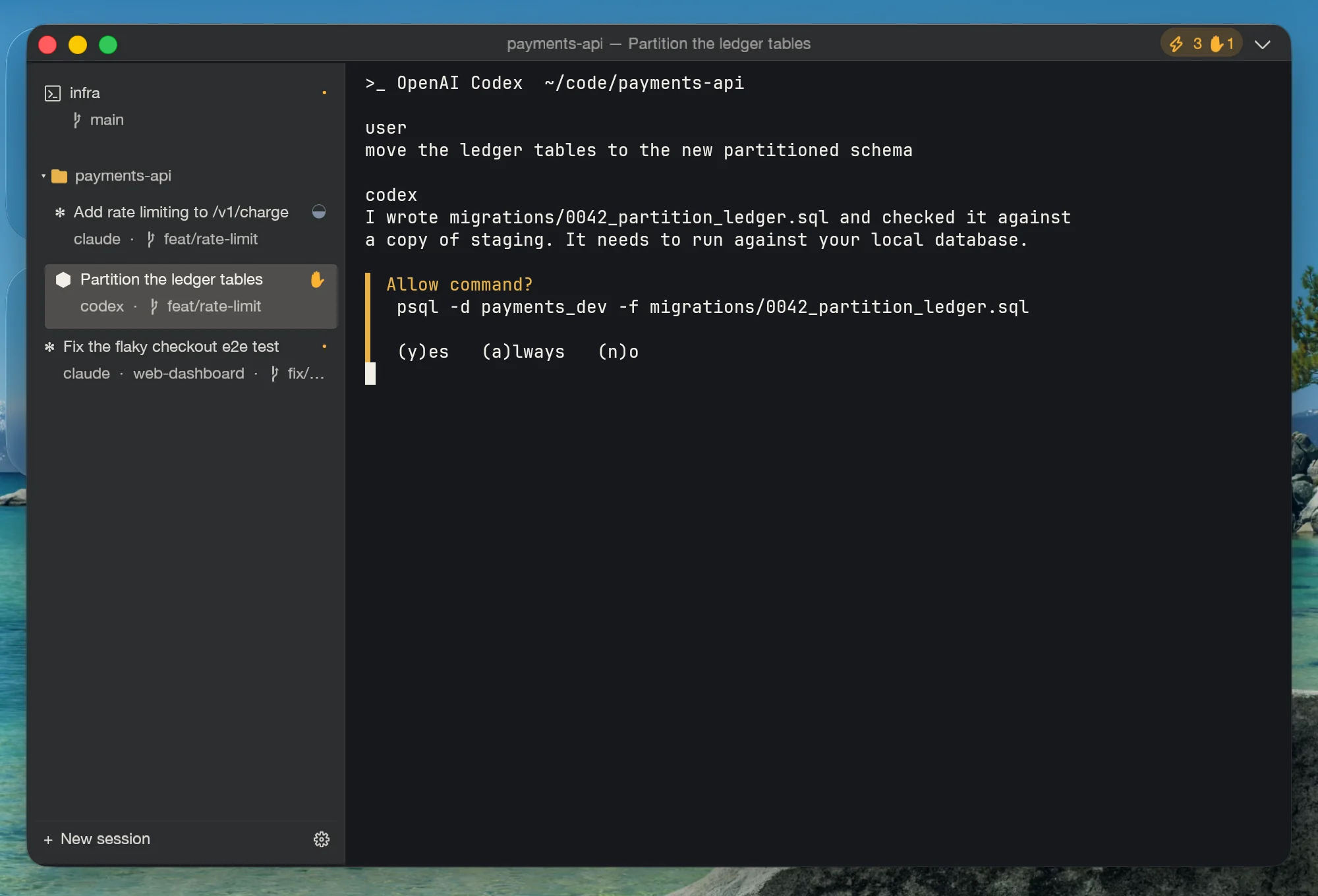
공식 hooks, 타이틀/OSC 파싱, 프로세스 감지, 화면 휴리스틱 — 네 겹의 신호가 pane마다 하나의 상태로 접힙니다: 작업 중(숨 쉬는 파랑), 응답 대기(호박색), 완료, 유휴. 상단 바는 모든 창을 집계하고, 무언가가 당신을 기다리는 순간 호박색으로 바뀝니다.

📥 에이전트 인박스

Ctrl+Shift+A: 모든 창의 모든 에이전트를 대기 중 우선으로 정렬해, 얼마나 오래 무엇에 막혀 있는지 보여줍니다. Enter를 누르면 해당 pane으로 바로 이동. “가서 y 좀 눌러주기”가 이제 키 두 번이면 끝납니다.

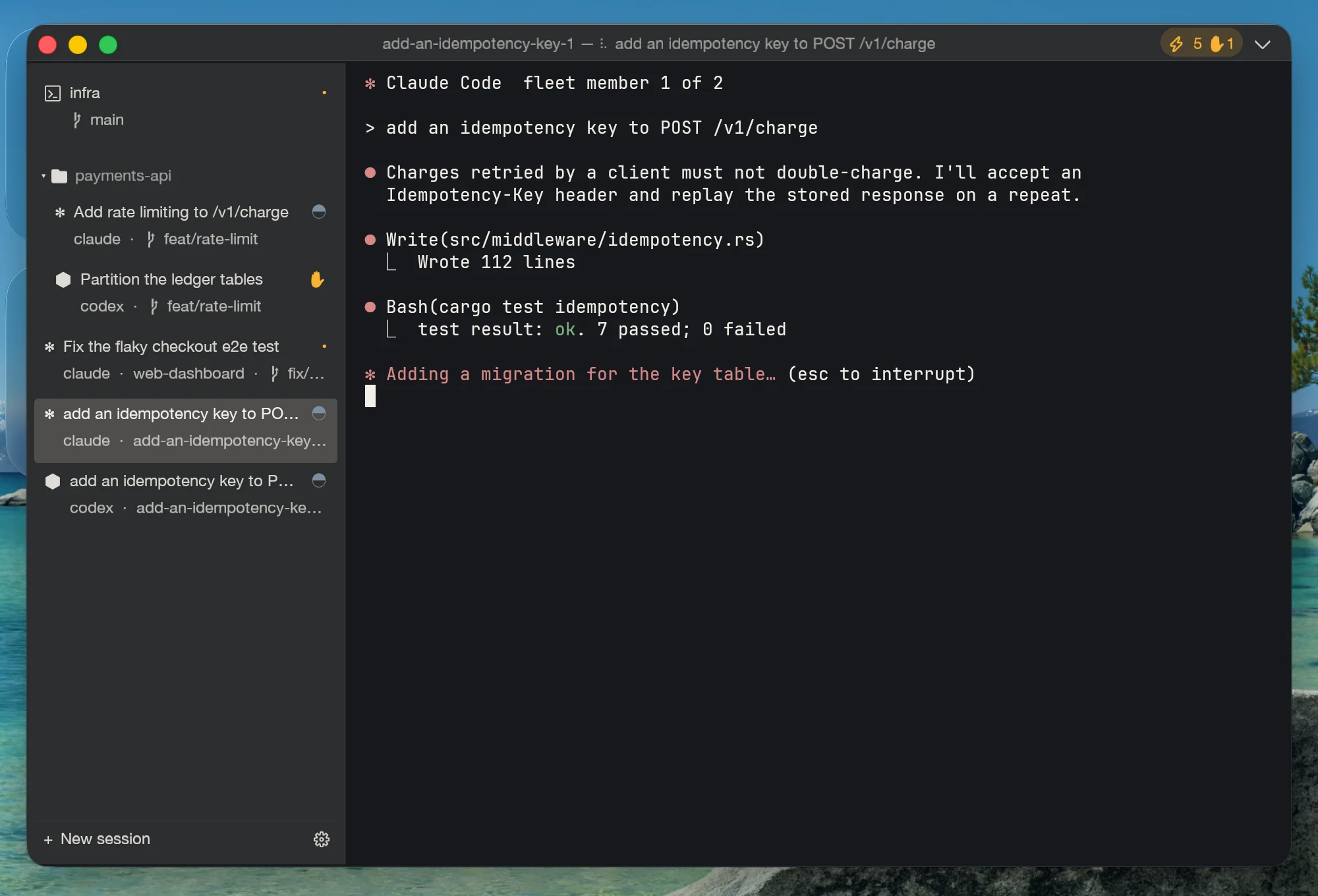
🚀 플릿: 하나의 작업, N개의 에이전트

claude × 2 + codex에게 같은 작업을 경쟁시키세요 — 각 멤버는 저장소 옆 자기만의 git worktree와 브랜치, 자기 탭, 자기 상태 배지를 가집니다. 당신의 작업 사본은 절대 건드리지 않습니다.

🔍 리뷰: 어떤 변경도 놓치지 않습니다

에이전트가 작업을 시작하는 순간 Unterm이 저장소 체크포인트를 만듭니다(dangling 커밋 — HEAD, 인덱스, 파일은 그대로). 에이전트가 새로 만든 파일까지 포함한 라인 단위 diff, 스테이징 상태로의 squash 머지(커밋은 여전히 당신 몫), 어느 체크포인트로든 롤백, 멤버 결과의 나란히 비교까지.

🔌 다른 모든 것처럼, 완전히 스크립트 가능

콕핏 자체가 MCP + CLI입니다: agent.status, cockpit.inbox, fleet.launch, review.merge… 오케스트레이션 에이전트가 사람 없이도 플릿을 띄우고 diff를 리뷰할 수 있습니다. 로컬 우선 — 이 모든 것이 클라우드를 거치지 않습니다.

에이전트 콕핏 문서 읽기 →

v0.61의 새로운 기능

Proxy auto-rotation that survives flaky nodes, full ghost-text completion for every AI CLI's flags and arguments, and zero-config Clash detection on Windows — the most recent releases, in four cards.

v0.63 세션은 창보다 오래 살아남고 — 설치판에 마침내 전부 담겼습니다

unterm-core가 세션을 소유합니다. 사용자별 프로세스가 shell·스크롤백·분할 레이아웃을 보관하고 MCP 서피스 전체를 제공하며 창을 닫아도 살아남습니다(v0.62). v0.63은 설치판이 마땅히 받아야 했던 릴리스입니다: core 데몬이 6종 패키지에 실제로 포함되고, 설정 페이지가 Core 모드에서 동작하며, 이모지가 처음으로 렌더링되고(번들 폰트는 FreeType이 그릴 수 없는 COLRv1이었습니다), 일시정지 후 타이핑 지연이 96ms에서 8ms로, macOS는 새 마크를 달고, 탐색기 우클릭에 “Open in Unterm tab”이 추가되었습니다.

v0.61 자체 커널: 실행 22ms 만에 라이브 컨트롤 표면

Unterm은 더 이상 WezTerm 포크 위에서 동작하지 않습니다. next-core는 이 제품을 위해 새로 작성한 터미널 커널입니다 — 파서, 스크린 모델, PTY 런타임, 폰트 스택, wgpu 렌더러 — 약 12k 소스 라인과 10개의 직접 의존성이라는 예산 안에서. 실행부터 라이브 MCP 표면까지 22ms(이전 7.1s), 유휴 시 코어의 6.6%(이전 80%), 20만 라인 처리량은 동일. 이전 커널과의 기능 패리티는 159개 요구사항 장부에 대해 항목별로 닫았고, 타이포그래피는 플랫폼 네이티브로: macOS의 진짜 신호등 버튼, pt 단위로 정확한 크기, 그리고 마침내 제대로 렌더링되는 CJK. 자세한 이야기는 블로그에서.

v0.57 Fleet verification loop, and a new mark

The fleet closes its own loop. Automatic verification per member — Review infers the right validation command (Cargo / Go / npm / pnpm / yarn / Python / Maven / Gradle / .NET) or runs yours, persists status + log, and gates squash-merge on a passing run (an audited force overrides). Members are ranked by verification and change size; failed ones retry in the same worktree without losing work. Plus review.verify / fleet.retry over MCP + CLI, grouped project navigation with fuzzy search in the sidebar — and the new command-loop brand mark on every surface.

v0.55 에이전트 콕핏

이제 터미널이 안의 에이전트를 봅니다: pane별 실시간 상태(탭 배지 + 창 전체 집계), 대기 중 우선의 에이전트 인박스(Ctrl+Shift+A), 하나의 작업을 N개의 격리된 worktree에서 N개의 에이전트로 돌리는 플릿, 체크포인트·diff·롤백·squash 머지를 갖춘 리뷰 페이지. 새 MCP 메서드 12개, 새 CLI 패밀리 3종.

v0.54 2.8× faster cold start, and no CPU spin under output floods

A performance release. Cold start ~780ms → ~280ms. Five startup-path wins: config keys validate against a precomputed set instead of rebuilding the whole config per key (Lua eval 297ms → 8ms), the redundant second config load is skipped, WSL distros are read from the registry instead of spawning wsl.exe, the 1119 built-in color schemes parse in parallel, and the GL context is prewarmed on a helper thread right after argument parsing. No more CPU core burned on output floods. On Windows, a throttled WM_PAINT handler used to leave the update region unvalidated, so the message loop spun at ~91% of a core during sustained output; it now drops to ~4%. MCP stays responsive mid-flood (was timing out at 30s, now answers in tens of milliseconds). Also fixed: the first terminal row no longer hides under the top bar, the settings-menu prewarm no longer fails on small glyph atlases, and unterm-cli without --id now targets the pane you're looking at.

View all releases on GitHub →

Five principles, no exceptions

01
Local-first, no cloud

Every server, every API endpoint, every recording lives on 127.0.0.1. No login, no telemetry, no subscription. Your shell history is yours.

02
AI lives outside the terminal

No chat overlay, no ghost-text autocomplete, no inline AI panel. The terminal is the surface — Claude Code, Cursor, your scripts grip it through MCP.

03
MCP is a first-class surface

Every product feature ships with an MCP method and a CLI subcommand on day one. If it can't be driven from outside, it doesn't ship.

04
Cross-platform parity is correctness

A feature that works on Windows but bails on macOS or Linux is a bug, not a 'not yet supported.' Mac, Linux, Windows ship together.

05
Subtraction over decoration

When a feature belongs to the OS, use the OS. Keep AI generation outside the terminal, core operation local, and use native Finder integration.

06
Respect the subscription. Default OAuth.

When you install an AI agent through Unterm, the default authentication mode is the vendor's official subscription (OAuth) — your Pro / Plus / Team plan. We never silently inject an API key into a session; per-token billing happens only if you explicitly switch the auth mode to 'bring your own API key' or 'custom endpoint' in the Configure form. This is an opt-in, not a footgun.

A terminal doesn’t need AI built in.
It needs to be drivable by AI.

This is the fork between Unterm and Warp — not a feature gap, a direction.

The lifespan mismatch

A terminal is a thirty-year tool; an AI model is a six-month component. Weld the AI into the terminal and the longest-lived tool you own is now defined by its shortest-lived part — when the model ages, the whole terminal ages with it.

You already have agents

Claude Code, Codex, Gemini CLI, Aider — you already run the strongest coding agents there are, and they get better every month. A chat box inside the terminal is just one more copilot to sign into, and it will never be the one you actually prefer.

What’s missing is grip, not brains

Agents don’t lack intelligence — they lack hands on the terminal. Unterm makes the terminal an MCP-drivable surface: spawn panes, run commands, read the screen, take scrolling screenshots, change settings, record sessions. An agent uses the terminal the way you do, instead of watching through glass.

Warp’s answer: put AI inside the terminal
  • AI embedded in the terminal UI, tied to their cloud — login, subscription, quotas
  • Their chosen models, upgraded on their schedule
  • The AI core is closed; your command context flows through their servers
Unterm’s answer: hand the terminal to AI
  • The terminal is an MCP surface — any agent plugs in and drives, today’s or next year’s
  • You pick the agent and the model; Unterm never locks you in
  • MIT, fully open source; everything stays on 127.0.0.1 — no login, no subscription, no telemetry

You’ll still be using a terminal in thirty years. Nobody knows which AI will be driving it then — which is why the only future-proof terminal is the one built to be driven.

How Unterm differs

Three terminals reset the bar in 2026. They each picked a different lane.

Feature Unterm Terminal.app Warp iTerm2 Ghostty
agent-first native paid free free
MCP-controllable from outside
Scriptable CLI for every action Python API
Built-in AI coding-agent launcher ✓ ×7
Agents auto-wire to the terminal's MCP
Agent Cockpit (Inbox · fleets · review) ~ cloud
Identity profiles (creds per window)
Multi-instance orchestration
Session recording → markdown ✓ md ~
Screenshot + file upload from MCP ~
Right-click = copy / paste gesture ✓ gesture menu menu menu menu
Built-in proxy management
Local-first, no cloud
AI inside the terminal ✗ (by design) ✓ (cloud) plugin
GPU rendering
macOS + Linux + Windows macOS mac+Linux
Open-source client ✓ MIT ✓ GPL ✓ MIT
9-language native UI ✓ ×9 OS en en en
Price $0 $0 freemium $ $0 $0

yes · no · ~ partial · ×N count. The ✗ by design on "AI inside" is the whole thesis: Unterm keeps the AI outside and exposes the terminal as the surface it grips.

Comparison reflects publicly documented features as of 2026-05-01. Other terminals may have closed-source or roadmap items not listed.

Get Unterm 0.17 v0.71.7

macOS bundle is signed with a Developer ID and Apple-notarized. Linux .deb / AppImage and Windows .msi / .zip are also published.

Open the latest release

자주 묻는 질문

What is Unterm?

A cross-platform terminal emulator with built-in MCP, HTTP, and CLI control surfaces. The product thesis: terminal as MCP-controllable surface, so any external AI agent can drive it from outside instead of having an AI baked into the terminal itself.

Claude Code가 내 승인을 기다리는 걸 어떻게 알 수 있나요?

Unterm은 모든 pane의 에이전트 상태를 추적합니다. Claude Code(또는 Codex, Gemini, Aider)가 확인을 기다리며 멈추면 해당 탭의 점이 호박색으로 바뀌고, 상단 바 칩이 개수와 함께 호박색이 되며, 그 에이전트는 에이전트 인박스(Ctrl+Shift+A) 맨 위로 올라옵니다 — Enter를 누르면 해당 pane으로 바로 이동합니다. Claude Code와 Gemini는 설정 없이 감지되며, “unterm-cli agent enable-hooks”로 hook 수준의 정밀 보고를 더할 수 있습니다.

여러 Claude Code 인스턴스를 충돌 없이 병렬로 돌릴 수 있나요?

네 — 그게 바로 플릿의 용도입니다. “unterm-cli fleet launch --agents claude,claude,codex -- 작업”을 실행하면 각 멤버가 저장소 옆 자기만의 git worktree와 브랜치를 받아, 서로를 밟을 수도, 당신의 작업 사본을 건드릴 수도 없습니다. 각 멤버는 실시간 상태 배지가 달린 자기 탭을 가지며, 리뷰 페이지에서 결과를 나란히 비교할 수 있습니다.

AI 코딩 에이전트가 바꾼 내용을 어떻게 리뷰하거나 되돌리나요?

에이전트가 저장소에서 작업을 시작하는 순간 Unterm이 체크포인트를 만듭니다 — HEAD, 인덱스, 파일을 전혀 건드리지 않는 dangling git 커밋입니다. 리뷰 페이지(웹 설정 안)는 에이전트가 새로 만든 파일까지 포함한 라인 단위 diff를 보여주고, 마음에 드는 결과를 스테이징된 변경으로 squash 머지하거나(커밋은 당신이 합니다), 버리거나, worktree를 어느 체크포인트로든 롤백할 수 있습니다.

Unterm은 어떤 AI 코딩 에이전트를 지원하나요?

런처에서 Claude Code, Codex CLI, Gemini CLI, OpenCode, Aider를 각각 클릭 한 번으로 설치하고 연결합니다. 콕핏의 상태 감지는 kimi, trae, cursor-agent도 기본으로 인식하며, 표준 터미널 신호(타이틀, OSC 9/777, BEL)를 내보내는 에이전트라면 무엇이든 기본 추적이 공짜로 붙습니다. 어떤 도구든 “unterm-cli agent signal”로 연동할 수 있습니다.

How do I copy and paste with just the mouse?

Right-click does both: with a selection it copies (and clears the highlight); without one it pastes at the cursor. On macOS, Ctrl+click is the same gesture. Inside terminal apps that take over the mouse (vim, htop, Claude Code), select with Shift+drag and a plain right-click still copies; without a selection the app keeps its own right-click — hold Shift to force Unterm's paste. There is no context menu to dismiss, and an empty clipboard is a quiet no-op.

How does it work with Claude Code, Cursor, or other agents?

Each Unterm window starts a local MCP server (TCP, JSON-RPC, auth-token gated). Point your MCP client at 127.0.0.1:<port> — the port + token are written to ~/.unterm/server.json on launch. The agent can spawn shells, run commands, read pane state, capture screenshots, toggle recording, and switch settings.

How do I drive multiple Unterm windows from one agent?

Each Unterm process is one instance with a NATO-phonetic name (alpha, bravo, …) recorded in ~/.unterm/instances/<name>.json. Call instance.list on any one of them to enumerate; pick by cwd / title / start order; connect to that instance's port with its auth token. ~/.unterm/active.json points at the most recent live instance for single-instance fallbacks.

How is this different from Warp?

Warp embeds AI inside a closed cloud orchestrator (Oz) — external tools like Claude Code can't drive Warp from outside. Unterm picks the third lane: keep AI out of the terminal, expose the terminal itself as an MCP-controllable surface, and let any agent grip it. No cloud, no login.

Where does my data go?

Nowhere external. MCP and Web Settings servers bind to 127.0.0.1 only. Session recordings land under <project>/.unterm/sessions/ with built-in redaction for tokens. There is no telemetry, no analytics, no login, no cloud round-trip. Your shell history is yours.

Does Unterm phone home, even once?

No. Zero telemetry by default — not even an opt-in dialog. The only outbound HTTP requests Unterm makes are: (1) at user request, when you click a download link in Web Settings; (2) by your shell, like normal — anything your terminal would do, it still does. We don't ship analytics, error reporting, install pings, or update checks.

Is there a paid tier or premium feature?

No. Unterm is MIT-licensed; the same single binary ships every feature. No subscription, no Pro tier, no plugin marketplace, no "buy now to unlock split panes." If you'd like to support the project, the Sponsor section above is the only ask.

How big is the install and runtime?

macOS DMG ~50 MB · Linux .deb 27 MB · AppImage 43 MB · Windows MSI 43 MB. At idle with one window open, resident memory is ~110 MB; scales linearly per pane. The native next-core engine renders through wgpu; runtime cost is normally dominated by the shell and applications in each pane.

Does Unterm detect my system language?

Yes. On first launch, Unterm reads the OS locale (defaults on macOS, $LANG on Linux, registry on Windows) and picks the closest of 9 bundled UI languages. You can override per window in Web Settings → Language. Translations live in unterm-services/src/i18n/locales/*.json — patches welcome.

What stops a rogue agent from running rm -rf on my repo?

Three gates: (1) MCP server only listens on 127.0.0.1 — no network access. (2) Auth-token gated; the token is in ~/.unterm/instances/<name>.json, an agent without read access to that file can't even connect. (3) First write from a new agent triggers a blocking Allow / Block / Always-allow banner; the audit log records every write attempt with calling agent's identity. You can revoke trust at any time from the Web Settings MCP tab.

How do I script it?

Use unterm-cli: session list, proxy status, theme set midnight, session record start, screenshot. Pass --json to any subcommand for raw JSON-RPC output suitable for shell pipelines and cron jobs.

Which platforms ship signed and notarized?

macOS: universal arm64 + x86_64 DMG signed with a Developer ID and Apple-notarized + stapled (no Gatekeeper warnings). Linux: .deb for Debian/Ubuntu and AppImage for any distro. Windows: WiX-built MSI installer and portable .zip. All published to GitHub Releases on every minor tag.

Is it open-source?

Yes — MIT licensed. The current GUI and terminal runtime use Unterm's native next-core engine. Source at github.com/zhitongblog/unterm.

How do I contribute?

Open an issue or PR on GitHub. The project tracks bugs, feature requests, and discussion in one queue. We bundle accumulated fixes into minor releases — patch-level versions don't trigger CI builds. Documentation lives in-repo at /docs.